For those of you who don’t already know, my company, Creative Folks, specialises in workflow solutions for printers, publishers, ad agencies, graphic designers and video production companies throughout Australia and New Zealand. This includes print, online and iPad app creation tools used to produce all the magazines on display in this post. Back in October I was interviewed by Ms. Jill Park from Publishers Australia about digital magazine creation. With kind permission from the PA Board, here is a copy of the transcript for your enjoyment.
What makes a good/bad iPad app?
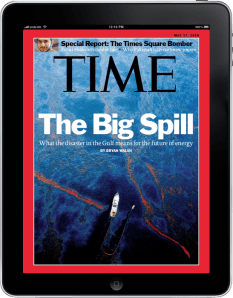 The iPad is all about maximising the end-user experience. A good iPad app should offer the consumer more than just a digital replica of the print copy. When gathering content for an article or story there is likely to be several photographs and extended text other than the few hundred words allocated to the page. There may also be historical content, video archives and audio files that offer relevancy to the subject. Print does not allow the publisher to take advantage of this extra material but the iPad allows you to present it with your own creative style.
Why should magazines create their own apps?
There is an art to magazine creation. The combination of photography, typography, design and editorial skills defines the quality of the product. With the right tool set in place, publishing companies are more than capable of producing their own apps and therefore controlling their own creativity.
However, internal app creation is not going to be a suitable business model for every publisher. Small teams on tight deadlines may find it easier and more cost effective to outsource the app creation to third party companies that offer these services at reasonable prices.
Is there a great demand for iPad apps for magazines?
Definitely. A quick search for the word ‘magazine’ on iTunes will deliver the user hundreds of results in various languages from niche titles to major brands such as Time, GQ, Wired and People.
How should the content differ for the print and iPad version?
The iPad offers a whole new level of creativity for designers. Photographic slideshows from the red carpet, video of the latest Lamborghini test drive, celebrity interviews, live sport results, social media interaction, even a dynamically updating TV guide are just some of the examples of how the content can differ from the print version.
The iPad has thousands of funky apps already available from astronomy to some very addictive games (have a look at Angry Birds and you’ll see what I mean). The point is, there is a lot of eye candy on the App Store so if you want the consumer to continue purchasing your product over all the other options available to them, then you need to offer them more than a high-resolution jpeg of the printed page.
What do editors looking to create their own apps need to consider?
Editors need to think beyond the page, which is something they should be used to doing considering that a lot of magazines have their own web site. A food magazine may want to include a step-by-step video of the featured recipe. A music title may want to include snippets from the cover band’s latest album or concert. Fashion shoots will want more than that ‘one good shot’. Gather and collect as much content as you can because that gives you more choice.
Don’t to it halfheartedly though. No video content is better than a few links to some low resolution YouTube clips.
Are these considerations different for apps for other devices?
Not really. The big difference will be the ability to use Adobe Flash in the other tablet devices.
How does the WoodWing app software work?
 WoodWing believes that good app design comes from good designers. They provide plug in tools for Adobe InDesign to enable the user to create the layouts and make best use of the available content. WoodWing Content Station allows the designer to adjust page positioning to ensure that the app flows smoothly for every swipe and tap; and provides an overview of the publication before the app is created. WoodWing Enterprise manages the collaboration within and between the design and editorial teams; and their Digital Magazine Server creates the app once the final design and layout has been approved. It is a simple process that involves very few steps, but one that gives control over the creativity of the app back to the designers, which is where it belongs.
Does it work across non-iPad devices?
It will as soon as the other devices become readily available. (postscript: WoodWing announced on October 6th that they had a cooperative agreement with Samsung to bring digital publications to the Galaxy Tab. Click here to read more.)
Is it suitable for publishers of all sizes?
WoodWing is an inexpensive modular solution. You don’t need to be a large publisher to use their products.
Which iPad apps for magazines do you think work best? Why?
Apps are continuously evolving and what works best for some may not be right for others. The original Time Magazine still offers video content, extra photos, extended editorial and engaging advertising. It is available to be purchased through a digital storefront and much of the extra heavy-duty content, such as audio and video files, is accessed as required when the user is online. WIRED, on the other hand, gives you absolutely everything in one humongous download. Both solutions work well. Sports Illustrated gives their readers access to a live scoreboard whereas Net-A-Porter provides a fashion shopping experience complete with product descriptions and editor’s recommendations.
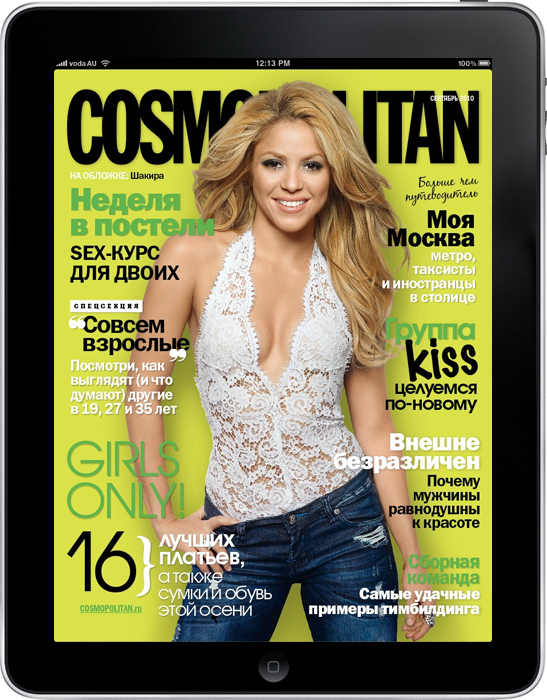
Recently released apps have become more of a hybrid solution that incorporates HTML5 technology to provide breaking news or animation for their covers and internal pages. For examples of these have a look at the Dutch apps Veronica and Auto Week or the Russian version of Cosmopolitan. Veronica launches with an up-to-the-minute TV Guide and the current version of Auto Week has a Lotus Evora winking at you with its halogen headlights.
 Cosmo uses a lot of animations within the pages of their magazine to create a unique and highly-engaging end user experience. Scrollable text columns in transparent overlays keep the photography visible underneath the article without impeding the readability of the story. Fashion hotspots provide the reader with extra product information when they tap on the models boots, skirt, accessories, etc. Even the advertisements have been upgraded with extra content. There is one article about Autumn fashion, I think – my Russian is not too good :-), where pastel coloured leaves fly around behind the text as if blowing in an invisible breeze (pictured). Cosmo really is one of the most creative pieces of magazine app design I have seen so far.
Some publications however have opted for a more simplistic approach. Jaguar Magazine has only a small number of pages but its content is laid out in a very stylish and elegant manner. The Guardian Eyewitness app offers the end user beautiful photography with tips on how the image was captured.
There are also some excellent examples of newspaper apps from the Australian, the New Zealand Herald and the Malaysian Star, to name but a few.
My advice to publishers is to research what’s available on iTunes already. Download titles that are similar to yours, and some that are vastly different as well. That will help you to get a feel for what features are available and what works best. Just because you CAN do something doesn’t mean you should.
Is there anything editors could learn from non-magazine apps? Please give examples.
Oh sure. Apps like Blogshelf and Flipboard present content in a clean and easy to read environment. Discover by Cooliris gives Wikipedia a makeover with article searching, rotatable pages that offer extra information such as maps and statistics, historical bookmarks, and daily cover changes. Apps such as the ABC and NPR bring news feeds to life with audio and visual content as well as the ability to share articles via email and social media. The Guardian Eyewitness app, as I mentioned before, demonstrates the iPad’s ability to display dazzling photography.
How can people monitor subscriptions?
Subscription management is the current hot topic for iPad publishing. Apple don’t offer a subscription mechanism at this stage so the best way to manage it is probably to emulate People Magazine. They have linked their iPad app to the print subscription so their customers can input their user ID and download the iPad app for free. If the user is not a print subscriber then they can buy the issue from iTunes and transact the purchase through Apple’s systems.
Creative Folks are a Strategic Partner of Publishers Australia.
About Publishers Australia
 Publishers Australia is a non-profit trade association that represents the leading B2B, specialist B2C, custom and digital publishers in Australia.
We currently have over 120 publisher members who produce more than 800 consumer, business and customer publications in total.
We have developed a powerful network of national and international alliances across the creative industries to keep our members up to date on matters that affect them.
We inform our members of industry trends; defend them against unnecessary regulation; and promote the editorial and financial health of our industry.
We have a strong interest in training and development through seminars, workshops, event keynotes, Excellence Awards, and an annual conference as well as access to a range of learning resources.
As publishers are becoming multimedia, cross-platform brands, we aim to guide our members into the future by providing advice on the digital revolution reshaping our industry.



 Matt's Notes